August 28, 2025
I read Perfect Media Server and built the software I wished existed
Alex Kretzschmar documents the right way to do home NAS storage. Nobody had built a GUI for it. So I did.
There's a website called Perfect Media Server, run by Alex Kretzschmar. If you've spent any time in the home NAS community you've probably hit it. It documents a specific way to set up home storage, MergerFS to pool the drives and SnapRAID for parity, and it explains why that combination works better for real home use than the usual alternatives.
I read the whole thing and came away with two convictions. The architecture was right, and nobody had built a proper GUI for it.
The detail that decided the whole architecture
It comes down to how a move works.
When your download finishes and you want it in your media library, the software renames the file instead of copying it. A rename is near-instant no matter how big the file is, because all you're changing is a pointer in the filesystem, while a copy moves every byte.
That sounds like a performance footnote, but it dictates the entire storage layout. If your files are striped across multiple drives, the way RAID5 works, the way ZFS stripes data, a "rename" between two logical paths can turn into a full cross-disk copy, and there's no config flag that gets you out of it.
MergerFS keeps each file whole on one physical disk. The pool is a logical union: you see one big drive, but underneath, every file lives completely on a single disk. When you move from downloads to media and both paths sit on the same underlying disk, it's a true rename and nothing actually moves.
That's why your download client and your arr stack work correctly with no special configuration; it falls straight out of the architecture.
There's a sharp edge here that I learned the expensive way. The arr stack uses hardlinks during import so the same file can seed in the torrent client and live in the library at once. My cache mover, the thing that migrates files off the NVMe cache onto the HDD array, would happily walk those hardlinked files and move them across filesystems, which silently breaks the link and forces a re-copy. The whole point of the architecture, defeated by my own tooling. The fix was eight lines: skip any file with more than one link.
// internal/storage/mover.go  (977eb17e)
// Skip files with hardlinks — arr stack uses them for seeding.
// Moving a hardlinked file across filesystems breaks the link
// and causes re-copy instead of seeding.
if stat, ok := info.Sys().(*syscall.Stat_t); ok && stat.Nlink > 1 {
    return nil
}
SnapRAID's unusual guarantee
Most parity systems, ZFS RAID-Z, classic RAID5, RAID6, stripe your data across every drive. Lose the array metadata or lose enough drives, and you lose everything, because no file exists anywhere as a complete unit.
SnapRAID works differently. It takes periodic snapshots of the pool and writes parity to dedicated parity drives. The data drives hold complete, unmodified files. If SnapRAID itself fails, if the parity drives die, if something goes badly wrong, the files are still sitting on the disks. You can pull any drive, plug it into any Linux box, and browse the files directly.
That's the guarantee you want for data that doesn't exist anywhere else: home photos, home videos, ripped Blu-rays. In the worst case you recover by reading a disk directly rather than feeding the whole array into a RAID reconstructor and praying it comes back.
The gap
Alex documents the architecture clearly. The tools, MergerFS, SnapRAID, the arr stack, are all open source and well maintained, and the community knows how to wire it together.
But you have to know how to wire it together. You're editing config files, running commands, tracking drives by hand. There's no UI that walks you through it, nothing that detects your drives, sorts them into NVMe cache or SSD mirror or HDD array, sets up SnapRAID for you, and shows you storage health on a dashboard.
So that's what I built.
What HomelabARR PE is
PE is a single Go binary with an embedded React frontend that implements the PMS architecture as a product. You install it on any Linux machine, it detects your drives, you assign roles, and it configures MergerFS and SnapRAID for you.
The Storage Setup Wizard handles the walkthrough. The dashboard shows array health, parity status, cache usage, and per-drive temperatures.
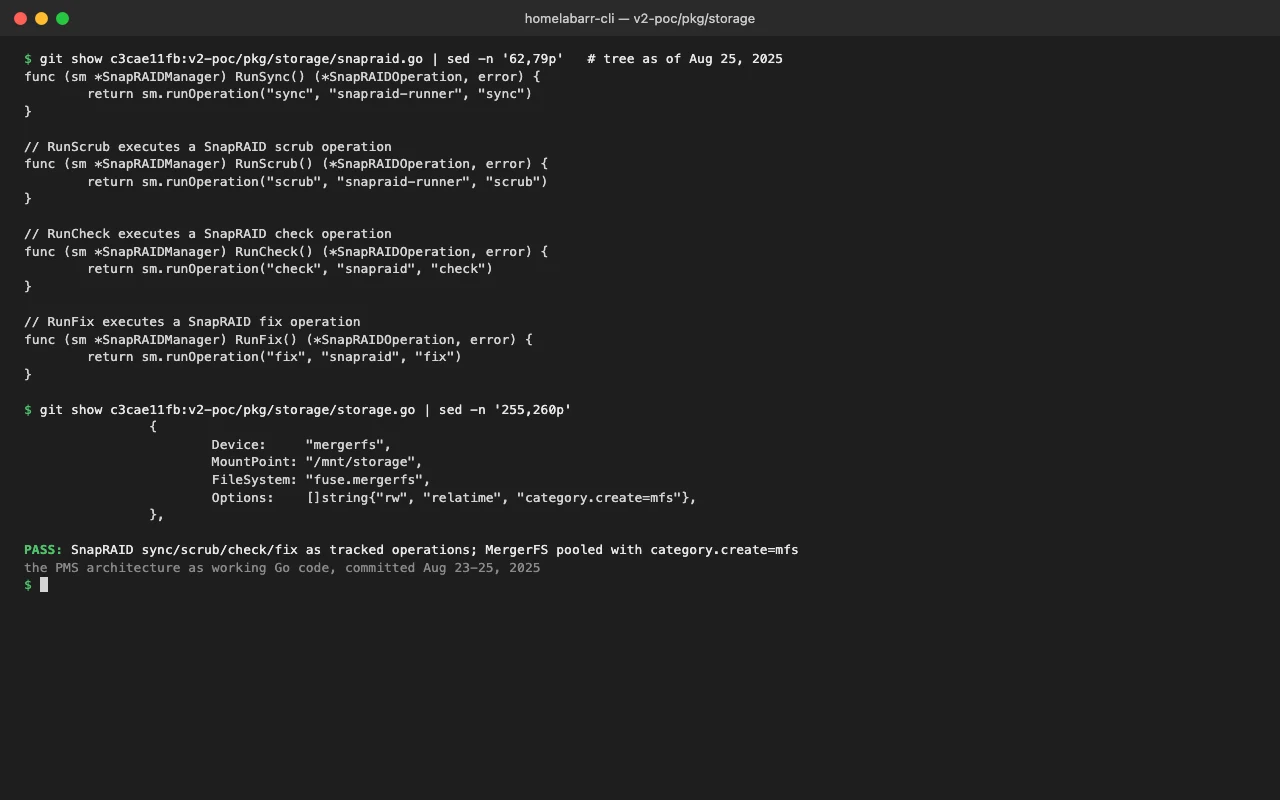
Behind the UI it's a real storage engine. snapraid.go drives sync, scrub, check and fix, each one a tracked background operation with progress parsing:
// pkg/storage/snapraid.go
func (sm *SnapRAIDManager) RunSync() (*SnapRAIDOperation, error) {
    return sm.runOperation("sync", "snapraid-runner", "sync")
}
func (sm *SnapRAIDManager) RunScrub() (*SnapRAIDOperation, error) {
    return sm.runOperation("scrub", "snapraid-runner", "scrub")
}
func (sm *SnapRAIDManager) RunCheck() (*SnapRAIDOperation, error) {
    return sm.runOperation("check", "snapraid", "check")
}
func (sm *SnapRAIDManager) RunFix() (*SnapRAIDOperation, error) {
    return sm.runOperation("fix", "snapraid", "fix")
}
storage.go manages the MergerFS pool with the category.create=mfs allocation policy Alex recommends, so new files land on the disk with the most free space:
// pkg/storage/storage.go
{
    Device:     "mergerfs",
    MountPoint: "/mnt/storage",
    FileSystem: "fuse.mergerfs",
    Options:    []string{"rw", "relatime", "category.create=mfs"},
}
The cache mover handles tiering. New files land on the fast NVMe, then move to the HDD array after a configurable age window, skipping hardlinked files for the reason above.
There are 100+ Docker app templates on top of all this, so you can run Plex, Sonarr, Radarr, Jellyfin and the rest from the same interface. That makes PE a full home server OS in its own right.
Why now
I got laid off in July 2025. I had seven thousand dollars and a 15-year-old at home, and I needed to build something real.
The storage question wasn't academic for me. I was building software I needed to exist, so the architecture had to actually work, not work in theory. After weeks of research, MergerFS and SnapRAID were the only stack that handled mixed drives reliably today.
ZFS AnyRaid, HexOS's bet on mixed-drive ZFS, still hasn't shipped. bcachefs is in the kernel, but even Linus has said it isn't something he'd trust for stability yet, and Btrfs RAID5/6 still carries a decade of trust issues.
MergerFS and SnapRAID are boring choices. They've been running in people's homelabs for years, and Alex has been writing about them since at least 2016.