April 17, 2026
Twenty Attempts at a Gap
A 7-pixel layout gap in the App Store page took twenty deploys to close because I kept solving the wrong problem.
The gap
Eight.ly Professional's App Store is a two-column layout. Left sidebar with 14 categories and 3,368 apps worth of navigation. Right content area with a grid of category tiles. The sidebar stretched to the bottom of the viewport, and the content area stopped short of it.
Below the last row of tiles there was a strip of slightly different background. A seam where the page just stopped. On a small viewport you might not notice. On my 1080p display it was the kind of thing you see once and then cannot unsee.
The wrong fix, on repeat
The content area looked transparent at the bottom, so the obvious read was a missing background. The first commit just added a background color. The next one moved it to an inline style with the CSS variable. Here is what that attempt actually looked like (01625e39):
// AppStore.tsx: the "it must be a background" attempt
- <div className="-m-4 flex h-[calc(100vh-64px)] overflow-hidden">
+ <div className="-m-4 flex overflow-hidden" style={{ minHeight: 'calc(100vh - 64px)', height: 'calc(100vh - 64px)', backgroundColor: 'var(--color-background)' }}>
...
- <div className="p-4 flex-1">{renderMain()}</div>
+ <div className="p-4 flex-1" style={{ backgroundColor: 'var(--color-background)' }}>{renderMain()}</div>
That var(--color-background) is its own small trap. The theme system writes --color-background, but Tailwind's bg-background class maps to --background. The two names look interchangeable and are not, so a background class can resolve correctly in one place and to nothing in another. I burned a few attempts chasing that mismatch. Every diagnostic I ran said the color was right while the gap sat there unchanged.
I am not going to pretend each of the dozen-odd attempts was clever. Most were the same idea wearing a different hat: outer div, inner div, wrapper, parent, inline style, CSS variable, both together. When you have decided the problem is color, every fix is a color fix.
The actual problem had nothing to do with color
The App Store renders inside MainLayout's <main>, which carries p-4, sixteen pixels of padding on every side. The App Store negates that with -m-4 to go edge to edge, then sets its own height to h-[calc(100vh-64px)], viewport minus the 64px header. The math is fine in the abstract, but in context it was wrong because of the parent.
MainLayout's content column wrapped its children and stopped. The flex parent above it filled the viewport, but the column was missing flex-1, so it never inherited that stretch. It was exactly as tall as its content. The App Store's viewport calc was correct in absolute terms while living inside a parent that ended before the viewport did. Here is the fix on the parent (3baa59bf):
// MainLayout.tsx
  {/* Main Content */}
  <div
-   className="flex-grow"
+   className="flex-grow flex flex-col"
    ...
  >
    ...
    {/* Page Content */}
-   <main className="w-full p-4">
+   <main className="w-full p-4 flex-1">
      <Outlet />
    </main>
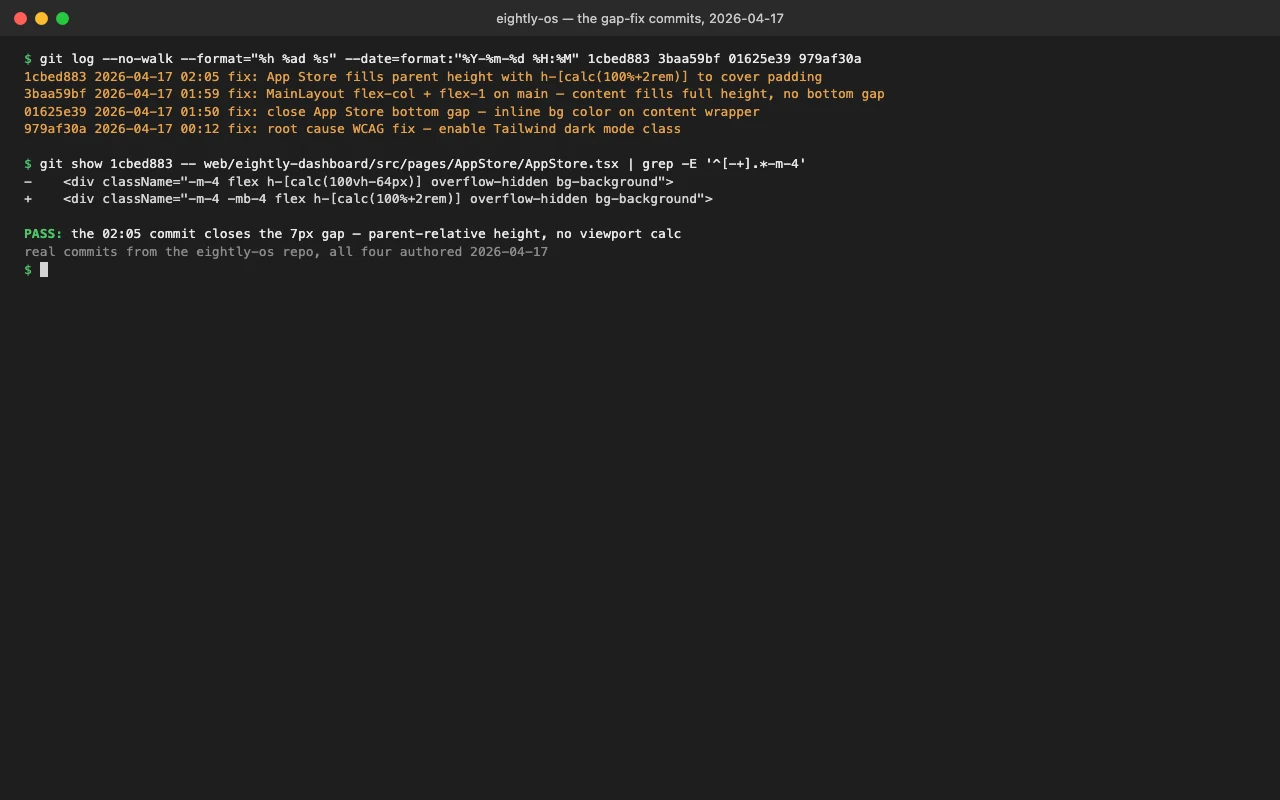
That fixed the parent height and shrank the gap, but it did not close it. A residual was still there, and it came from the padding arithmetic. The App Store negates p-4 with -m-4, so it needs to reclaim the 32px of vertical padding that negation removes from the height budget. A viewport calc cannot do that, because it does not know about its parent's padding. A relative one can. The final fix (1cbed883):
// AppStore.tsx
- <div className="-m-4 flex h-[calc(100vh-64px)] overflow-hidden bg-background">
+ <div className="-m-4 -mb-4 flex h-[calc(100%+2rem)] overflow-hidden bg-background">
Height of the parent plus the 32px the margin negation took back, and no viewport anywhere in the expression.
I should have measured first
The sidebar was 1080px. The content area was 1073px. That 7px was the whole debugging session. If I had pulled the bounding rectangles on the first attempt instead of the tenth, I would have seen a height mismatch and never touched a background property. I assumed the symptom was the cause and paid an hour for it.
The real fix that day was upstream of all of this
The gap was the smaller part of the session. The good part came earlier, and it explains why the page even looked off in the first place.
Earlier that day I did a full WCAG contrast audit across the app and kept hitting unreadable text on dark backgrounds. Class after class like text-gray-600 dark:text-gray-300 was rendering the light-mode color on a dark theme. The colors had nothing to do with the root cause. The dark: variants were never activating at all (979af30a):
ROOT CAUSE: darkMode:'class' in tailwind.config.js requires a 'dark'
class on <html>, but applyTheme() never added it. Every dark: variant
in the entire app was dead — text-gray-600 dark:text-gray-300 was
rendering gray-600 (#4b5563) on dark backgrounds (2.2:1 contrast).
Tailwind's darkMode: 'class' only flips dark: variants when there is a literal dark class on the <html> element. The theme system set CSS variables and forgot to add that class, so every dark: rule in the entire app had been silently dead. The fix was two lines in two files:
// themes.ts, applyTheme()
if (theme.category === 'dark' || theme.category === 'high-contrast') {
  document.documentElement.classList.add('dark')
} else {
  document.documentElement.classList.remove('dark')
}
// initTheme.ts: add the class before React mounts, so there is no flash
const lightThemes = ['purple-gradient', 'minimal'];
if (!lightThemes.includes(savedTheme)) {
  document.documentElement.classList.add('dark');
}
The contrast cleanup that hung off this ran across four commits and roughly two dozen component files, mostly swapping bare text-gray-700 for theme tokens like text-muted-foreground. None of that mattered while the toggle was dead. For a while I literally could not read my own UI and assumed I had picked bad grays.
The rest of it
Alongside the gap and the contrast work: redesigned the app cards to match Eight.ly's Docker app, added an app detail modal pulling real project URLs out of the template data, rebuilt the category landing pages, and added skeleton loading states to the dashboard and App Store so the first paint is never a blank rectangle. The App Store skeleton even shows the real category names and icons up front and only shimmers the counts that are still loading.
Every one of those went out by hand. Cross-compile, scp, systemctl restart, because GitHub Actions billing is still broken on the private repo and CI will not build for me.
The lesson I keep relearning
When the visual does not match what you expect, measure the elements before you theorize about them. Pull the bounding rectangles, compare the numbers, and only then decide what kind of bug you have.